%20(2).avif)
%20transparent.avif)

Run Z-Image without a complex manual ComfyUI setup
This guide explains how to run Alibaba’s Z-Image workflow inside Promptus, providing a streamlined, no-code experience for ComfyUI users. Whether you are using the Promptus Web interface or the Desktop App, follow these steps to master high-performance image generation.
📋 1. Prerequisites
Before you start, ensure your environment meets these requirements:
- App: Latest version of Promptus.
- Hardware: 12–16GB VRAM GPU recommended (Quantized GGUF versions can run on 4GB VRAM).
- Automation: Promptus automatically handles workflow loading, model downloading, and file management so you can focus on creating.

📂 2. Loading the Z-Image Workflow
Promptus ships one‑click CosyFlows templates for Z-Image — every one currently in the catalog, so you can pick the exact variant for your hardware and task instead of hand-building a workflow:
- Z-Image-Turbo: Text to Image — the efficient single-stream diffusion transformer variant, built for speed (6–9 steps). Supports both English and Chinese prompts; the fast, general-purpose starting point.
- Z-Image: Text to Image — the non-Turbo foundation model. Slower than Turbo, but offers more diverse aesthetics, higher photorealistic quality, stronger response to negative prompts, and is the better base if you plan to fine-tune.
- Z-Image-Turbo: Fun Union ControlNet — adds multi-control guidance on top of Turbo: Canny edges, HED, Depth, Pose, or MLSD, so you can constrain composition instead of relying on prompting alone.
- Promptus: Z-Image Text to Image [bf16] — the full-precision preset. Highest quality output, but needs real GPU headroom; on 8GB Macs, use one of the GGUF presets below instead.
- Promptus: Z-Image Text to Image [GGUF-Q2] — the smallest quantized preset (z-image-Q2_K.gguf), tuned for 512×512 output in 4 steps. Fastest and lightest on VRAM, at the cost of some detail versus Q4/Q8.
- Promptus: Z-Image Text to Image [GGUF-Q4] — the mid-size quantized preset (z-image-Q4_K_M.gguf). A balance point: noticeably better detail retention than Q2, still far lighter than the full bf16 model.
- Promptus: Z-Image Text to Image [GGUF-Q8] — the largest quantized preset (z-image-Q8_0.gguf). Closest to bf16 quality among the GGUF options, at the cost of more VRAM and slower generation than Q2/Q4.
- Text to Image — the Z-Image-Turbo BF16 preset pulled from Promptus's Getting Started library. Same model as the bf16 preset above, packaged as a first-run template if you're new to Z-Image.
Steps:
- Open Promptus.
- Navigate to the CosyTemplates tab and search “z-image.”
- Pick the variant above matching your hardware, then click Load in ComfyUI or Run Online in Playground.
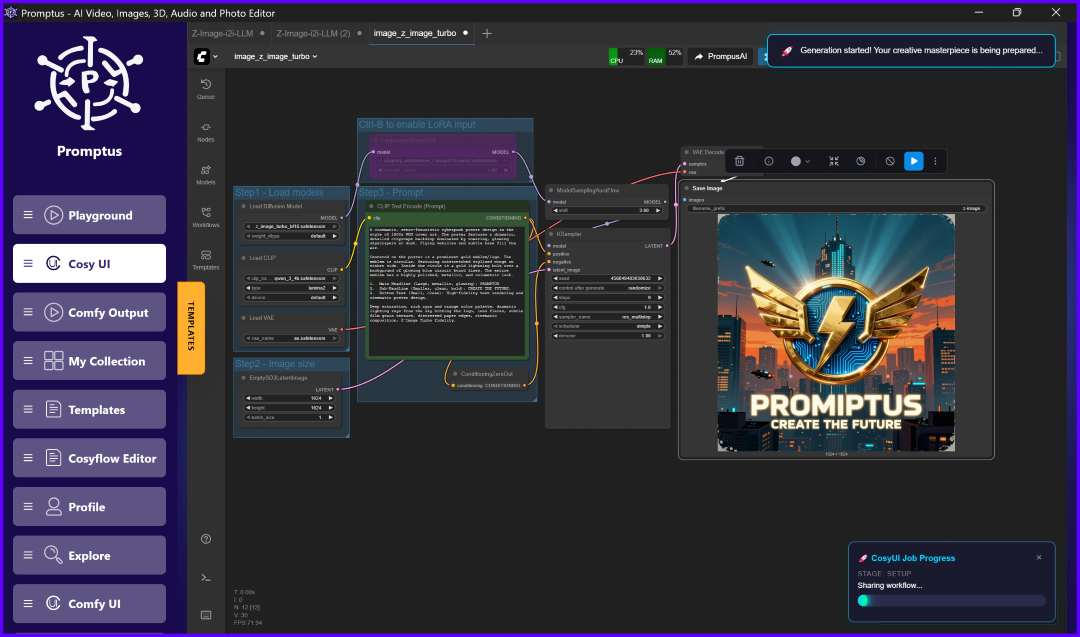
- The visual pipeline (UNet Loader, CLIP Text Encode, KSampler, etc.) will appear on your canvas, fully configured.
📥 3. Model Configuration
Promptus detects missing models and prompts you to download them automatically.
💡 Tip: Simply click "Download All Models" and Promptus will place them in the correct directories for you.
✍️ 4. Prompting & Sampling
To get the best results from the Z-Image architecture, use these optimized settings:
- Positive Prompt: "A cinematic portrait of a young woman standing in warm sunset light, shot on a 50mm lens, ultra-realistic, detailed skin texture."
- Steps: 6–9 (Z-Image Turbo is highly efficient).
- CFG: 1.0–3.0.
- Sampler/Scheduler: Euler or Euler A / Simple.
🖼️ 5. Image-to-Image (img2img) Capabilities
Transform existing visuals using the dedicated img2img workflow:
- Add your image via the Load Image node.
- Adjust Denoise Strength:
- 0.2–0.4: Subtle retouching.
- 0.5–0.7: Medium style changes.
- 0.8–1.0: Heavy transformation (e.g., Anime to Realism).
🎨 6. Using LoRAs
Enhance your style or characters by adding LoRAs:
- Add a LoRA Loader node after the UNet.
- Set strength between 0.5–1.0.
- Include specific trigger words in your positive prompt.
- Note: You can chain multiple LoRAs for combined effects.
✨ Best Practices for Success
- Keep Prompts Concise: Z-Image understands complex concepts without "prompt salad."
- Camera Styles: Use keywords like 50mm, IMAX, or Fujifilm to influence the render's "feel."
- GPU Optimization: If you experience slow renders, switch to the Promptus GPU Marketplace for high-end cloud power.
🏁 Conclusion
You are now ready to run Z-Image without a complex manual ComfyUI setup. Promptus provides the infrastructure; you provide the vision.