%20(2).avif)
%20transparent.avif)

DreamActor M2.0 brings serious upgrades in quality, consistency, and cost efficiency.
Quick answer: DreamActor M2.0 is BytePlus's motion-transfer model, available directly in Promptus for stable, controllable, production-ready motion — see how it performs against Kling 2.6 in our head-to-head motion-control comparison below.
DreamActor M2.0 is officially available in Promptus.
While many AI motion tools are still stuck in the “cool demo” phase, DreamActor M2.0 is clearly aiming higher — toward stable, controllable, production-ready motion transfer.
DreamActor M2.0 model is available to creators directly through Promptus, BytePlus’s partner platform. Let’s break it all down.
What Is DreamActor M2.0?
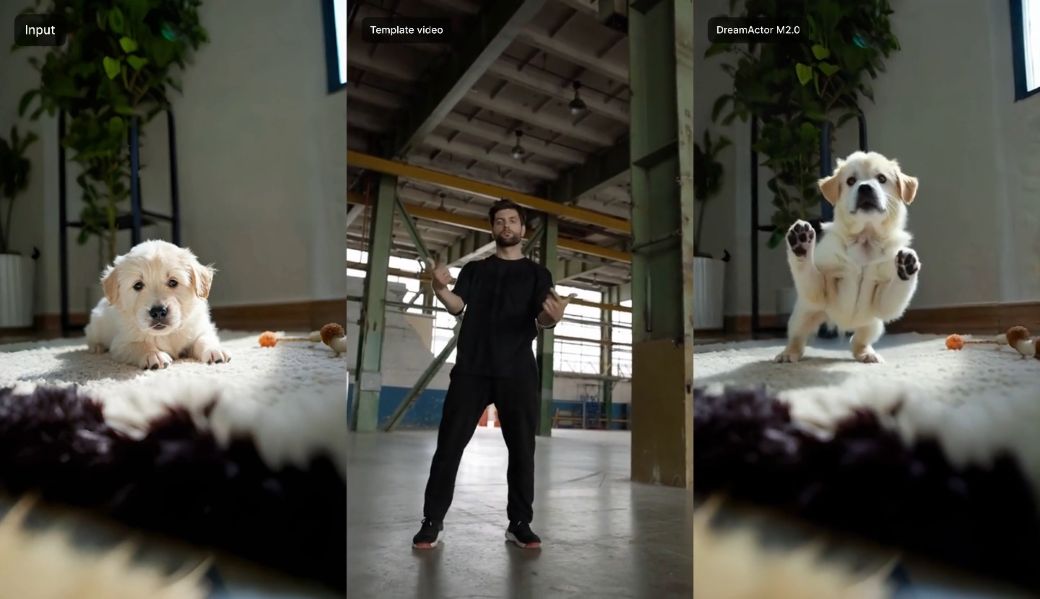
DreamActor M2.0 is a next-generation AI motion control model that allows you to animate a character using just:
- One static image
- One template (reference) video
The model transfers:
- Body motion
- Facial expressions
- Lip movements
…from the template video onto the image, while preserving the subject’s identity, structure, and background consistency throughout the clip.
The result is motion that feels intentional, complete, and far more stable than what most creators are used to seeing from AI motion tools.

How DreamActor M2.0 Works
At its core, DreamActor M2.0 is a large-model-driven motion transfer system.
Here’s the high-level flow:
- Input a single character image
Human, animal, or stylized/anime character. - Input a template video
This defines motion, expressions, and lip sync. - Large model motion understanding
The system interprets performance holistically — not just frame-by-frame pose matching. - Consistent animated output
The generated video maintains:- Structural stability
- Identity consistency
- Background coherence
This makes DreamActor M2.0 especially strong for complex actions, multi-character scenes, and non-human subjects.
How to Use DreamActor M2.0 on Promptus
Creators access DreamActor M2.0 directly through Promptus, an AI creation platform and official partner of BytePlus.
Promptus acts as the user-facing environment where creators can run DreamActor M2.0 efficiently and at scale.
Step 1: Upload Your Character Image
Choose a clean, well-defined image:
- Clear facial features
- Stable body proportions
- Minimal motion blur
DreamActor M2.0 performs especially well with:
- Animals
- Anime and stylized characters
- Non-human IPs
Step 2: Upload a Template Video
Your template video defines the performance:
- Body movement
- Facial expressions
- Lip motion (if dialogue is involved)
Best results come from videos with:
- Clear, readable motion
- Stable framing
- Strong expression cues
Step 3: Configure and Generate in Promptus
Within Promptus, users can:
- Select DreamActor M2.0 as the motion control model
- Pair image and template video inputs
- Manage multiple runs or variations efficiently
Promptus provides a streamlined interface for running DreamActor M2.0 without needing custom pipelines or engineering overhead, making it ideal for both individual creators and teams.
Step 4: Review and Iterate
Once generated, creators typically review:
- Motion completeness
- Facial and body stability
- Lip-sync accuracy
- Identity and background consistency
DreamActor M2.0’s outputs tend to require less corrective iteration compared to earlier motion control systems.
DreamActor M2.0 vs Kling 2.6 Motion Control
In comprehensive evaluations, DreamActor M2.0 shows clear performance advantages over Kling 2.6 Motion Control.
Quantitative Results
- Overall GSB performance: +9.66% improvement compared to Kling 2.6
This indicates more stable, controllable, and reliable output quality.
Qualitative Advantages
DreamActor M2.0 significantly outperforms Kling 2.6 in:
- Multi-agent driving
More consistent coordination across multiple characters.
- Action completeness
Motions feel finished, not partially realized.
- Subject structural stability
Faces, limbs, and bodies hold their form across frames.
- Animal and anime consistency
One of its strongest differentiators — far fewer distortions in non-human content.
These strengths make DreamActor M2.0 far more suitable for real production workflows.
Pricing Comparison
Cost efficiency is another major advantage.
- Kling 2.6 Motion Control is 1.4× to 2.24× more expensive
- DreamActor M2.0 delivers higher performance at a lower price point
For studios or creators generating at scale, this difference is substantial.
For more pricing and API details for DreamActor in Promptus.
Who Is DreamActor M2.0 Best For?
DreamActor M2.0 is especially well-suited for:
- AI filmmakers and video creators
- Studios producing multi-character scenes
- Projects involving animals or anime IP
- Teams requiring consistent, repeatable output
- Large-scale content production via Promptus
If you care about stability, control, and scalability, this model is clearly designed with you in mind.