%20(2).avif)
%20transparent.avif)

Multiple Character Angles from One Reference Image, Locally
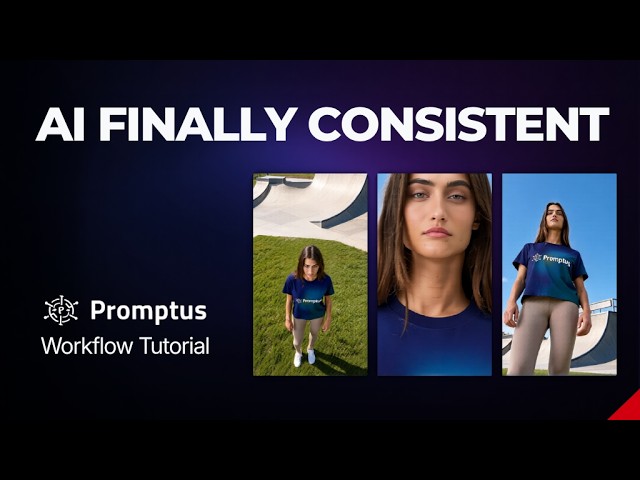
Short answer: Upload one picture to the 1 Click Multiple Character Angles CosyTemplate and it returns several camera views — front, side, 45 degrees, aerial — of the same character in one run. A sister template does the same for scenes. On an 8 GB laptop GPU, lower ImageScaleToTotalPixels to 0.5 megapixels to avoid running out of memory.
| Template | Input | Output | Try it |
|---|---|---|---|
| 1 Click Multiple Character Angles | One image of your character | Multiple views of the character | Open template |
| 1 click Multiple Scene Angles | One image of your scene | Aerial, low-angle and wide views | Open template |
Why rotating a character usually breaks
Ask a model for the same person from a new angle with a prompt alone and the face drifts, or a logo on a T-shirt gets lost. This workflow starts from the reference image and uses camera-perspective nodes to say exactly where the camera goes, so the identity carries across views. In the demo, the jawline, the eyes and the Promptus logo on the shirt held as the view turned.
How to run it
- In Promptus, open CosyTemplates and find the multiple-angles template.
- Upload your reference image.
- Click Run — no prompt engineering needed; the workflow handles the camera moves.
- For custom settings, open it on the ComfyUI canvas.
Make it fit a laptop GPU
| Setting | Default | Laptop value | Effect |
|---|---|---|---|
| ImageScaleToTotalPixels | 1 megapixel (about 1,050 px) | 0.5 | Much lower VRAM use; avoids CUDA out-of-memory |
| KSampler seed | Fixed | Randomise | A fresh set of perspectives each run |
Tested on an NVIDIA RTX 4060 laptop GPU with 8 GB of VRAM, using Qwen2.5-VL 7B as the vision-language encoder and the Wan VAE, all running locally — no cloud queue or credits.
Who it’s for
- Character artists making turnaround sheets.
- Game developers producing concept art.
- Comic and manga artists keeping a character consistent.
- Architects rendering a building from several viewpoints.
For keeping a face consistent across whole scenes rather than angles, see three methods tested and training a LoRA. Download Promptus.