%20(2).avif)
%20transparent.avif)

How to Use Flux AI Image Generator for Free: Complete Guide
Quick answer: Promptus offers a free trial to generate online before you buy. After a one-time purchase, every generation is free and unlimited going forward — the app runs Flux and other models locally on your own GPU, with no per-image credits and no ongoing subscription, unlike cloud-based generators that charge indefinitely per image.
Flux has revolutionized AI image generation with stunning quality and open-source accessibility. This guide shows how to use Flux on cloud platforms—no expensive GPU needed—while exploring comfyUI alternatives and advanced techniques.
🚀 What Makes Flux AI So Popular?
Released by Black Forest Labs, Flux is an open-source image model that quickly gained attention for its:
- 🔍 Photorealistic quality
- 🛠️ Versatility across styles
- 🤖 Even used by Elon Musk's Grok
Flux often outperforms established tools, making it a go-to for creators seeking premium results.
⚠️ The Challenge of Running Flux Locally
Running Flux on your personal device isn’t easy:
- Requires 24GB VRAM or more
- Demands expensive GPUs
- Local setups are hardware-intensive and censored on many commercial platforms.
Result? Creators are left with limited access or high costs.
☁️ Cloud-Based Solution: Promptus
Promptus solves this by offering a powerful desktop local app with Flux model access and zero credit cost.
🧰 Key Models on Promptus:
- LTX-2 Video with Audio
- Auto1111 WebUI (Stable Diffusion)
- 100s of CosyTemplates Local Generation
- Wan model of workflows
- 🧑🎨 Focus (for character consistency)
- 🧬 Face Fusion (for face swaps)
- ⚙️ ComfyUI (advanced workflows)
- 💥 Auto1111 Forge (optimized for Flux)
👣 Getting Started with Promptus
- 🔐 Sign up with your email
- 🧭Generate for free on Promptus web
- 🧪 Try all tools with free credits
- 🖥️ Use the “Free Launch” to enter the interface
Each tool is clearly labeled for easy navigation, whether you're making images, characters, or videos.
🧠 Generating Images with Flux
- Choose from the workflows
- Click the Install Locally
- Hit "Generate" and input your prompt
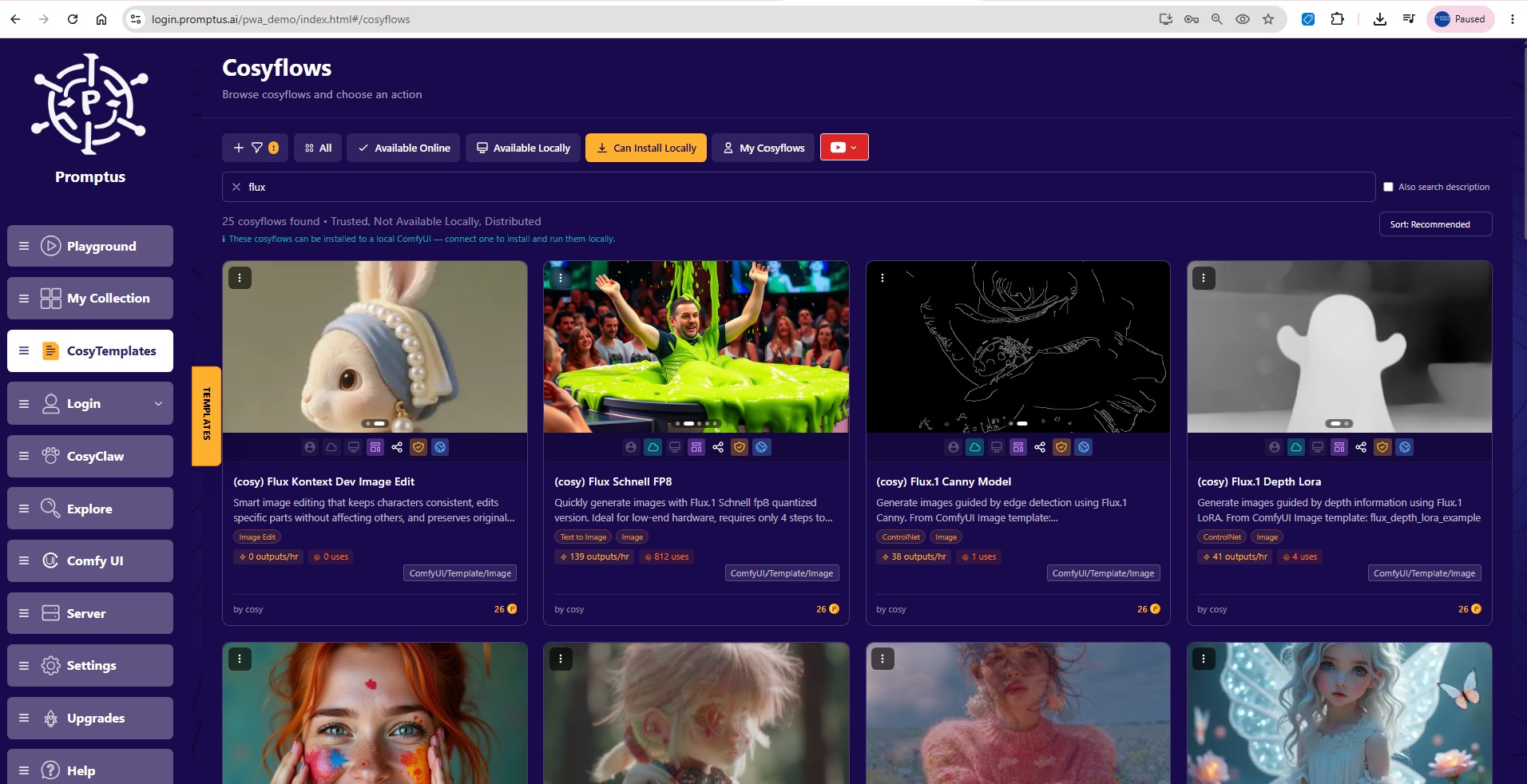
Some of the most popular Flux models and custom AI image workflows you can start exploring are:
(BFL) flux-kontext-max
(BFL) flux-kontext-pro
(BFL) flux-pro
(BFL) flux-pro-1.1
(BFL) flux-pro-1.1-ultra
(BFL) FLUX.1 Image Editing
(BFL) FLUX.1 Text to Image
(BFL) FLUX.2 Image Editing
(BFL) FLUX.2 Multiple Image Editing
(BFL) FLUX.2 Text to Image
(cosy) Flux Kontext Dev Image Edit
(cosy) Flux.1 Canny Model
(cosy) Product Mockup(Flux.2 Dev FP8)
✅ Optimal Workflow:
- Model: Switch to Flux in dropdown
- Prompt: Try simple ones like "a beautiful woman looking at the camera"
- Steps: Start with 50 for balance
- Aspect Ratio: Choose before clicking “Generate”
✨ Advanced Styles & Prompt Techniques
Flux handles a huge range of styles:
- Add
"animation style"for Pixar, anime, Disney-level art 🎬 - Use
"selfie.jpg"for ultra-realistic portraits 📸 - Combine terms for realistic lighting, water, textures
🎯 Pro Tip: Complex prompts yield cinematic scenes with stunning realism.
🧑🤝🧑 Face Swapping with Face Fusion
- Upload source and target images
- Select Face Enhancer model
- Output Quality: Set to 100
- Use Preview before finalizing
💡 The results are shockingly real—ideal for character design and creative projects.
- Promptus uses CosyFlows, a drag-and-drop Comfy interface.
- Built-in models: Gemini Flash, HiDream, Hunyuan3D
- Collaboration-ready: Real-time editing + Discord integration
Great for individuals and teams who want a Comfy alternative with a UX twist. Check-out all the AI models in Promptus.
💸 Cost-Effectiveness & Accessibility
💡 Most tools charge per image—not great for experimentation. Promptus you buy the local app, once and can generate for free with no token or generation cost. Cloud / web generations have a small credit charge based on the workflow and model you select. For the best free experience generating and editing Images using Flux we recommend the Promptus local AI app - we are rated as the number one local app for generating AI images and videos giving you:
- Unlimited image creation
- Premium model access
- Freedom from hardware limits
This levels the playing field for creators at all levels.
🧭 Responsible Usage Guidelines
🛑 These tools are powerful. Use them ethically:
- Respect privacy and consent
- Unless generating locally on your device (ie. on local mode in Promptus) you will be limited by to upstream provider for content filtering
- Avoid generating harmful, misleading, or non-consensual content
🏁 Conclusion
Flux AI marks a major leap in visual generation—delivering:
- Local free generations without limits
- Fast images with less than 2 seconds per image on a local computer using Promptus
- Advanced image creating and editing features at low cost for cloud generation
Now that you're using Promptus, you're equipped to generate AI images, videos, music, 3D and more with freedom, speed, and quality.