

MiniMax H3 Image: Edit Photos Locally in ComfyUI
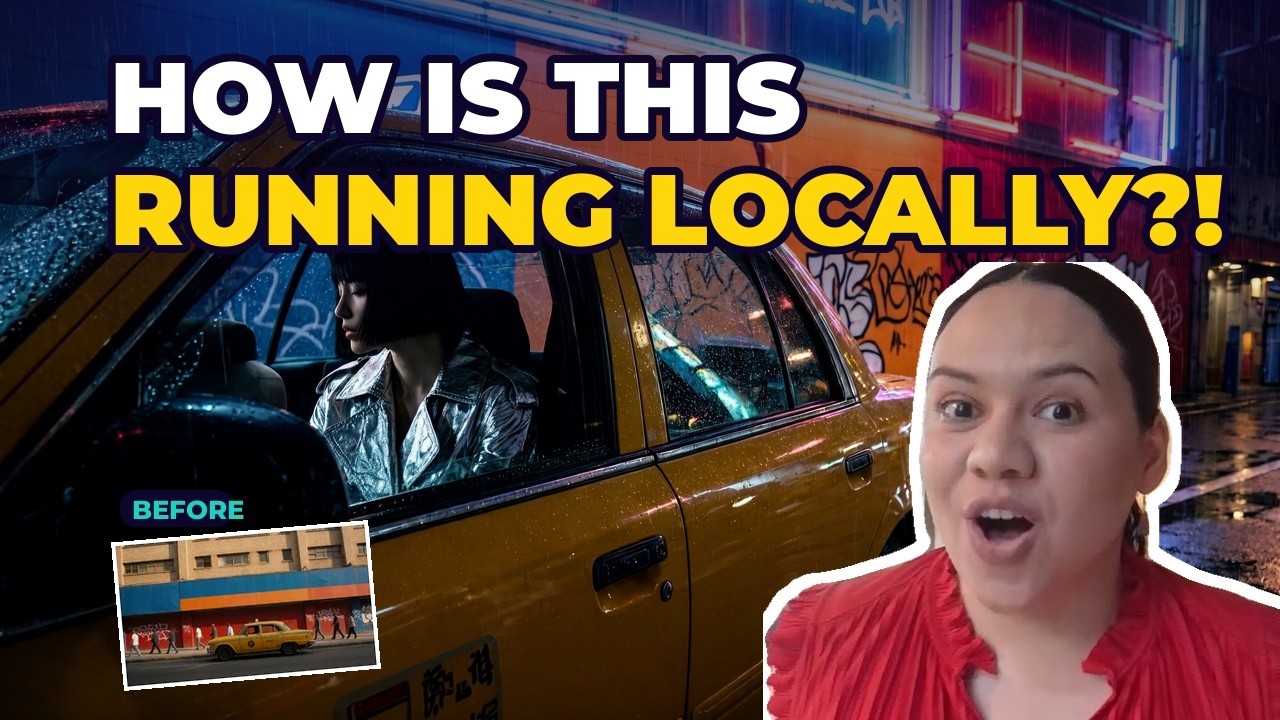
MiniMax H3 Image is an open AI image model that makes and edits pictures on your own computer, with no website and no upload. I ran it in ComfyUI on a laptop and gave it a daytime photo of a yellow taxi plus six words: “make it night, keep the taxi”. This guide shows what it does, how I set it up, and what it used on my graphics card.
Every number below was measured on my own laptop (NVIDIA RTX 5090 Laptop GPU, 24 GB) with the GGUF version of the model. Your times will differ with your GPU.
What is MiniMax H3 Image?
MiniMax H3 Image comes from MiniMax, the company behind the Hailuo video models. They have released the model files so you can run it yourself. Three things make it different:
- It makes big pictures. Output is around 16 megapixels, which is poster size.
- One model does both jobs. It makes new pictures and edits the ones you already have.
- It takes many reference images. You can give it several pictures at once. The ComfyUI Wiki lists up to 16.
Check the licence first. As I say in the video, the model's licence does not cover the UK, the US, the EU or South Korea, so check the terms for where you live before you use it.
How to install MiniMax H3 Image in ComfyUI
- Update ComfyUI (or Promptus) to the latest version. Older versions show red nodes for this model.
- Open the official MiniMax H3 Image workflow in ComfyUI. The templates are called
image_minimax_h3_image_t2i(text to image) andimage_minimax_h3_image_edit(editing). - In Promptus you can drag the workflow in and use it as a CosyTemplate.
- The full model is very large, so I used a smaller compressed copy called GGUF. The image model alone is about 12 GB, and all-in setup took me about 20 minutes.
How does MiniMax H3 Image make a picture?
Most image models clean up a picture 20 to 30 times. MiniMax H3 Image does it in 6 steps. There is also a setting called CFG that pushes a model to follow your prompt; this model doesn't need that push, so it stays at 1. Both are already set in the workflow.
My first text-to-image picture took 214 seconds on the laptop, with GPU memory peaking at 23.4 GB.
Why do six words become a full description?
When you edit, your instruction doesn't go straight to the image model. It first goes to a smaller helper model together with your photograph. The helper looks at the picture, reads your words and rewrites a full description: the lighting, the colours and everything that should stay the same. The image model then draws from that description. So you write the idea and it writes the details.
For the taxi edit, my six words became a 159-word description.
The image model also works big. It splits the canvas into tiny 32-pixel squares and works on them all at once. At 16 megapixels that is over 16,000 squares.
How to edit a photo with MiniMax H3 Image
I loaded a yellow taxi photographed in daylight and typed “make it night, keep the taxi”. The edit took 128 seconds and peaked at 22.9 GB of GPU memory.
Tip: the workflow scales your photo before editing, because small photos make weak edits. Start from a sharp photograph.
How to use multiple reference images
I added a second photo and wrote one sentence: “put her in the taxi backseat, rain in the window”. That edit took 130 seconds and also peaked at 22.9 GB.
Here is the catch: each reference image has to be connected in two places, once to the helper model and once to the image model. If you miss either connection, the model ignores your picture.
How much VRAM does MiniMax H3 Image need?
With the GGUF version on my RTX 5090 Laptop GPU (24 GB), GPU memory peaked at about 23 GB, which is almost the whole card. There is an even smaller copy of about 7 GB, but I haven't tested it, so I can't give numbers for it. If you try a smaller card, tell me what you got.
My measured results:
- Text to image (first picture): 214 seconds, 23.4 GB peak GPU memory
- Photo edit (taxi, day to night): 128 seconds, 22.9 GB peak
- Two-photo edit (add a person): 130 seconds, 22.9 GB peak
MiniMax H3 Image errors and fixes
- Red nodes: your ComfyUI or Promptus is too old for this model. Update to the latest version.
- Out of memory error: use the GGUF version.
- Weak edit: your starting photo was too small. Use a sharper, larger photo.
- Your reference picture is ignored: connect it to both the helper model and the image model.
Frequently asked questions
Can I run MiniMax H3 Image on my own PC?
Yes. MiniMax released the model files, and it runs locally in ComfyUI or Promptus with no upload. I ran it on a laptop with a 24 GB RTX 5090 GPU using the GGUF version.
How many steps does MiniMax H3 Image need?
Six steps with CFG at 1, and no negative prompt. The workflow sets this for you.
Can MiniMax H3 Image edit my photos?
Yes. One model both creates new pictures and edits existing ones, and you can add reference images to edit with more than one photo.
How long does it take to set up?
About 20 minutes on my connection, including the roughly 12 GB image model.