

ZONOS3: Free Local AI Voice Cloning in ComfyUI
ZONOS3-Mini is a new open-source AI voice model from Zyphra that can clone your voice from a short recording and runs on your own computer, with no website and no upload. I cloned my own voice with it on a laptop, designed a brand-new voice with sliders, made it speak Spanish from an English recording, and scored it against my real voice and my ElevenLabs clone. This guide shows how to set it up, how both clone methods work, and what I measured.
Every number below was measured on my laptop (NVIDIA RTX 5090 Laptop GPU, 24 GB) unless it says it comes from Zyphra. Your times will differ with your GPU.
What is ZONOS3-Mini?
ZONOS3-Mini is a text-to-speech model: you give it text and it speaks it. Zyphra released the weights under the Apache 2.0 licence, so you can use what you make commercially. Here are the key specs from Zyphra's model card and technical report:
- Size: about 800 million parameters in total, but only about 100 million run at once, which is why it is quick even on a laptop.
- Voices: 27 ready-made voices, plus cloning from your own recording.
- Languages: 43.
- Audio quality: 44.1 kHz output, the same sample rate as a CD.
How fast is ZONOS3 on a laptop?
Each built-in voice made six to seven seconds of speech in 0.67 to 0.83 seconds, so it talks faster than real time.
How to install ZONOS3 in ComfyUI or Promptus
- Install the free ComfyUI-ZONOS3 node pack: in your
ComfyUI/custom_nodesfolder rungit clone https://github.com/claudianeodev/ComfyUI-ZONOS3.git, or drop the single filezonos3_comfyui.pyfrom the GitHub page intocustom_nodes. In Promptus, use the ComfyUI tab'scustom_nodesfolder. - Restart ComfyUI and load one of the two templates that come with the pack: ZONOS3 Clone Your Voice or ZONOS3 Design a Voice.
- Press Run. On Windows with an NVIDIA GPU, the first run sets everything up by itself: it downloads Zyphra's local server (about 0.8 GB) and the model with its 27 voices (about 1.2 GB), so about 2 GB in total, only once.
- Everything goes into one folder,
ComfyUI/models/zonos3, so you can delete that folder to remove it all.
On Mac or Linux: automatic setup is Windows-only for now. Run Zyphra's own server (see the ZONOS3-Mini repo) and point the ZONOS3 Server node at it.
How to use the built-in voices
Pick a voice in the ZONOS3 Voice node, type your text and press Run. You can also blend two voices together, for example 70% of one and 30% of another, with the Voice Blend node, or pick one of 8 presets such as a chatty podcaster or a late-night radio host.
How to design a new voice with sliders
The ZONOS3 Voice Design node has 25 sliders, including gender, age, pitch, room, pace, chatty, happy and calm, plus 15 accents. You don't need a recording at all.
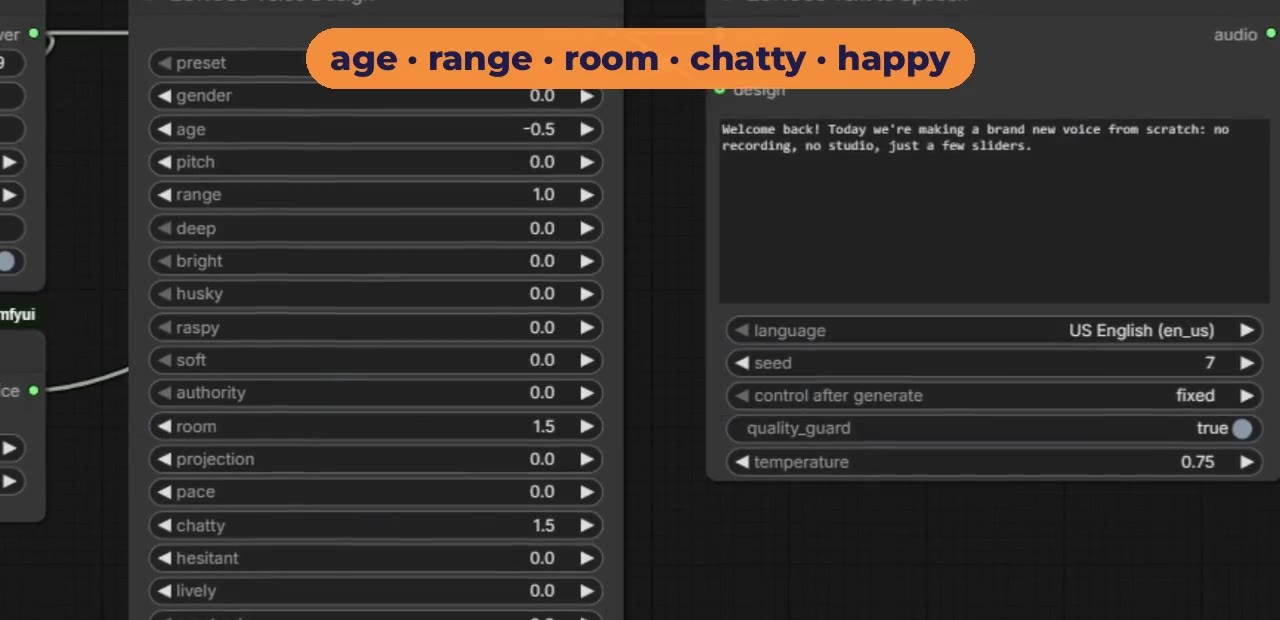
Tip: don't stack the mood sliders. Liveliness, Happy and Chatty each raise the pitch, and together they add up. With all three at maximum, the built-in voice Thaddeus went from about 97 Hz to about 394 Hz and started to mumble. Chatty 1.5 plus Happy 1 kept him natural, at about 111 Hz.
How to clone your own voice with ZONOS3
Drop your own recording into the Load Audio node in the Clone Your Voice template. Use 10 to 30 seconds of just you talking, with no music and as little background noise as possible. There are two clone methods:
- Voice profile turns your clip into a short fingerprint of numbers. It is steadier and works with every slider.
- Raw clip uses the whole recording. It needs an extra 5.6 GB download the first time you choose it. My first raw-clip run took about two minutes including that download, and about five seconds after that.
On pitch, my raw-clip clone landed at 204 to 210 Hz, against 209 Hz in my real recording. In Zyphra's own tests the voice profile scores higher for voice match: 83.1 out of 100 for voice profile and 77.7 for raw clip. Those are Zyphra's results, not independent tests.
Only clone your own voice, or a voice you have permission to use.
ZONOS3 vs ElevenLabs: which voice clone sounds more like me?
I made the same sentence three ways: with both ZONOS3 clone methods, and with my own ElevenLabs voice clone on Eleven v4. Then I scored each one against my real voice with two independent speaker-matching models (SpeechBrain ECAPA and Resemblyzer), using a different part of my recording from the one being tested. Higher means closer to me, and my real voice saying the same sentence shows the ceiling.
On this sentence, both ZONOS3 methods came out closer to my real voice than my ElevenLabs clone on both models, and ElevenLabs pitched me about 65 Hz too high. Two caveats: it is one sentence, and my ElevenLabs voice may have been cloned from a different recording from the one I gave ZONOS3. Treat it as a first test, not the final word.
Can ZONOS3 speak other languages in my voice?
Yes. I have never recorded a word of Spanish, but my English recording was enough for the clone to speak a Spanish sentence. Set the language in the Text to Speech node to any of the 43 supported languages.
ZONOS3 errors and fixes
- The first run seems stuck: it is downloading about 2 GB. The log is in
ComfyUI/models/zonos3/gguf/zonos3-server.log. - Raw clip takes a long time the first time: it downloads an extra 5.6 GB once, then restarts the server.
- The voice sounds strained or high: you have stacked Liveliness, Happy and Chatty. Turn two of them down.
- Anything else: paste the exact error message in the YouTube comments or open an issue on GitHub.