%20(2).avif)
%20transparent.avif)

Review of Black Forest Lab Flux 1 and Flux 2 AI Image Editing Models
Black Forest Labs has officially shifted the landscape of open-weights AI image editing. Renowned for its in-context editing capabilities, Flux 1 Kontext offers remarkable speed, consistency, and structural preservation, outperforming many existing cloud-only SaaS tools in real-world applications.
Beyond standalone models, the entire suite of FLUX.1 and the next-generation FLUX.2 (including the lightning-fast "Klein" architecture) has been integrated into node-based deployment platforms, giving creators unprecedented choice in where and how they compute.
Why is Flux 1 Kontext Special
Unlike traditional AI generation tools that require complex prompting or struggle to replicate subjects accurately, Flux 1 Kontext excels in maintaining strict visual consistency across multiple edits. While multi-modal models offer general image manipulation, Flux 1 Kontext stands out for its superior pattern matching and reliable structural adherence.
The foundation model scales across three core tiers:
- Flux 1 Kontext Max – Highest parameter performance, optimized for enterprise-grade, complex scene composition.
- Flux 1 Kontext Pro – Balanced compute-to-quality architecture for versatile commercial use.
- Flux 1 Kontext Dev – The open-weights powerhouse built for custom optimization, community fine-tuning, and direct local integration.
Testing Results & Performance
Real-world evaluation highlights Flux 1 Kontext’s ability to treat an initial image as a live canvas.
Example Evaluation Test:
- Input: Upload a high-resolution, long-sleeve patterned shirt.
- Prompt: “Place this shirt on a man standing near a mountain lake.”
- Result: Perfect retention of the shirt's texture, seam structure, and pattern orientation, naturally draped on a newly generated subject with cohesive global lighting.
Complex Scenarios Handled with Ease:
- Atmospheric & Environmental Shifts: Transforming a scene seamlessly from crisp winter snow to harsh summer sunlight.
- Contextual Style Transitions: Shifting a subject from casual streetwear to highly detailed cyberpunk aesthetics.
- Precise In-Context Inpainting: Modifying localized visual elements without mutating the surrounding background or breaking character composition.
🧠 Core Features at a Glance
- Structural & Character Consistency: Preserves intricate character details, clothing patterns, and facial topology across successive iterative edits.
- Sub-Second Distillation: When utilizing distilled or quantized variants (like FP8 formats), render times drop drastically, allowing for fluid, interactive creation.
- Natural Language Layout Control: Eliminates the need for heavy prompt engineering; short, descriptive text modifiers accurately dictate complex spatial edits.
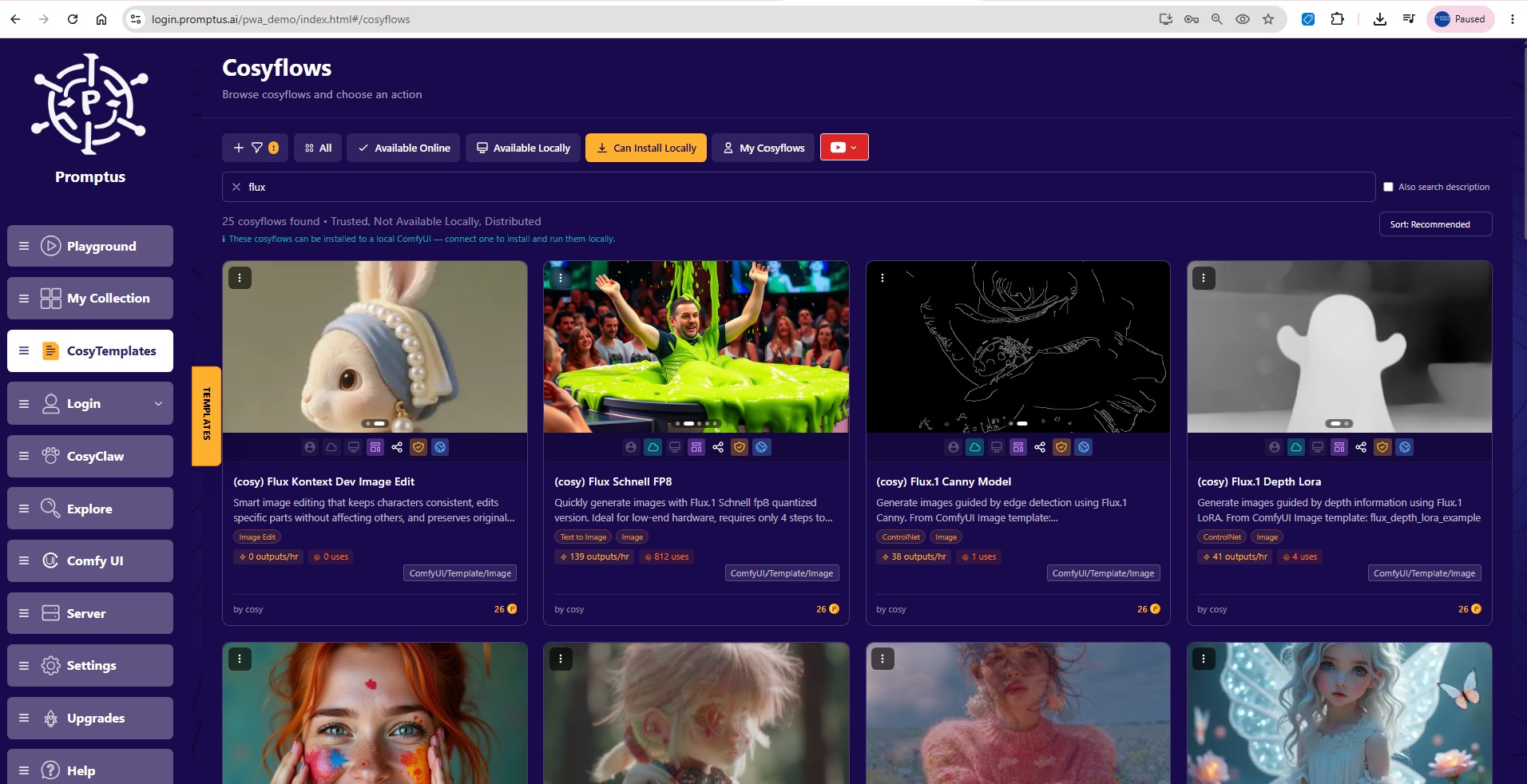
ComfyUI workflows to Cosyflows
You no longer need to choose between heavy cloud subscriptions or complex command-line installations. The entire catalog of modern creative workflows is now available as standardized templates (Cosyflows) that give you total infrastructure agility.
⚡ Web vs. Local Hardware
The true power of this ecosystem is that every single workflow listed above can be run interchangeably in two ways, completely eliminating subscription fatigue and cloud lock-in:
Option A: Run Instantly on Promptus Web
Don't want to strain your local hardware? You can execute any of these high-performance FLUX.1 and FLUX.2 workflows instantly inside the browser using cloud infrastructure. Just select "Run Online in Playground" to test, iterate, and generate on demand without managing models or dependencies.

Option B: Deploy Locally via Promptus
For absolute digital sovereignty, privacy, and unlimited offline generation, you can run these exact same workflows directly on your own machine.
- Open your local Promptus local app .
- Turn on your ComfyUI server in Promptus.
- Click "Load in ComfyUI" or "Install Locally" to instantly bridge the template to your hardware.
This downloads and configures the node structure directly onto your machine, letting you generate enterprise-grade imagery cloud-free.
🔮 The Future of Creative Automation
FLUX.1, FLUX.2, and platforms like Promptus.ai prove that AI image generation is moving past the "random lottery slot machine" phase. We are officially entering the era of predictable, non-destructive, professional utility.
Whether you need the instant access of browser-based cloud playgrounds or the uncompromised security and cost-efficiency of local hardware execution—the tools to build professional, production-ready creative pipelines are now completely in your hands.