%20(2).avif)
%20transparent.avif)

Complete Guide to Multi-Image Generation with Flux.2
Flux 2 Multiple Image Editing has received major updates within Promptus, introducing a new level of creative power for AI image generation. This guide walks you through the CosyTemplates to use the Flux model and different workflows including multiple reference images to edit your images—with impressive accuracy and consistency.
Whether you're building professional scenes, testing concepts, or exploring character-based storytelling, this update offers greater control than ever before.
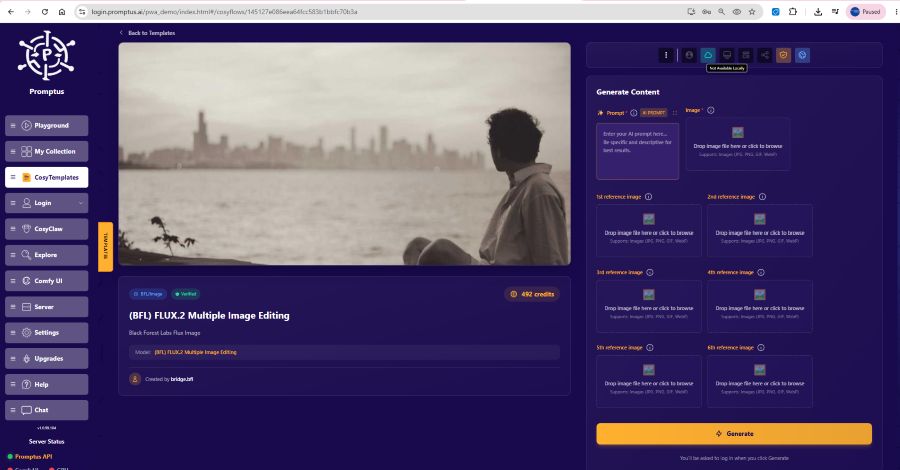
Get Started with Flux.2
- Log into Promptus
- Select Flux.2 Multiple Image Editing from the model options
- Upload up to six reference images you will be using to edit
- Type your prompt box and hit the generate button
This feature allows you to use up to six reference images simultaneously—perfect for combining logos, props, backgrounds, characters, and textures into a single cohesive scene.
Advanced Multi-Reference Techniques 🔗
Flux.2 excels at merging distinct characters, props, clothing, and environments with high realism. You can mix and match your files across the available image drop-zones on your screen to build a complete scene out of individual parts:
- 1st reference image box: Drop a photo of your primary character or face.
- 2nd reference image box: Drop a clothing item (e.g., a specific hoodie, leather jacket, or uniform).
- 3rd reference image box: Drop a product asset (e.g., a branded soda can or a specific gadget).
- 4th reference image box: Drop a background environment (e.g., a city skyline, a clean office, or a textured wall).
Creating Simple Logo Placements 🧢
Start with basic tests to learn how Flux.2 handles multi-references. A common example:
Prompt:
“Place the white logo and text on the left chest of the woman’s black t-shirt.”
Tips for Best Results 🔑
- Avoid vague terms like "logo"—be clear about placement and context
- Be Literal: Use specific, descriptive language (e.g., "left chest", "centered on the front").
Try this workflow
- Slot 1: Trained character
- Slot 2: Clothing item (e.g. hoodie, armor)
- Slot 3: Product (e.g. branded soda can)
- Slot 4: Background (e.g. city skyline, painted texture)
When using trained characters, always include: “Maintain exact face likeness and outfit.”
This ensures consistent visual identity across all iterations.
Working with Multiple Subjects 👤
A standout feature of this update is its expanded multi-character scene support. The system is highly capable of retaining:
- Clothing textures and fabric details
- Baseline facial structures
- Small accessories, glasses, and handheld props
Best Practices for Layouts
- Color-Code Your Prompts: Identify different people by distinctive clothing or colors so the AI doesn't mix them up.
- Use Structured Action Phrases: Write clear directions like, “The man in the blue suit shakes hands with the woman in the red dress.”
- Lock Continuous Details: Always include the line “Maintain facial likeness and pose consistency” to hit a 90–95% visual fidelity rating across variations.
This results in 90–95% character fidelity—a massive improvement over earlier generations.
🖌️ Style Transfer & Photorealistic Conversion
Flux.2 naturally leans toward photorealism, making it ideal for transforming:
- 2D comic or anime characters into realistic renderings
- Painted textures or backgrounds into immersive environments
- Cartoon-style props into life-like visuals
Use the fourth reference slot to add style, texture, or lighting without affecting the core subject.
🧪 Quality Considerations & Fixes
While powerful, the model has limitations in some scenarios (e.g., full-body shots, distant figures). Here’s how to improve results:
⚙️ Quick Fixes
- Use an upscale workflow with detailed refinement
- Generate multiple variations to find the most stable output
Why Promptus Is the Ideal Platform 💡
Promptus isn't just where Flux.2 runs—it's a full visual AI platform built for creative professionals.
Why Choose Promptus? 🌐
- Run Flux workflows locally and on the web with CosyFlows
- Cloud-powered and local install available
- Access to elite models: Gemini Flash, HiDream, Hunyuan3D
- Tools for real-time collaboration, workflow publishing, and Discord integration
Whether you're building a quick weekend concept or developing a production-grade workflow, Promptus offers a flexible, professional-grade creative environment.
Conclusion: Multi-Reference AI Generation 🧩
The updated Flux.2 inside Promptus redefines what’s possible with multi-reference AI generation. It delivers:
- Enhanced visual consistency
- Smarter scene composition
- Scalable support for creative teams and solo artists
Paired with the collaborative and intuitive power of Promptus, Flux.2 becomes more than just a model—it’s part of a full creative system.
From experimental scenes to commercial content, this is the next evolution of AI image generation.