%20(2).avif)
%20transparent.avif)

Master FLUX.1 Kontext: Advanced AI Image Generation in Promptus
Quick answer: Flux.1 Kontext is Black Forest Labs' image-editing-focused model, best for in-context edits guided by natural language rather than pure text-to-image generation. Promptus runs it locally alongside FLUX.2, SDXL, SD 3.5, and Z-Image, so you can pick the right model per task instead of committing to one.
Flux Kontext — Black Forest Labs describes its models as delivering "state-of-the-art in-context image generation and editing" — has arrived in Promptus, bringing a groundbreaking approach to AI image generation. This powerful multimodal model understands both images and text, enabling you to generate, edit, and transform visuals with incredible context-aware precision.
What Makes Flux Kontext Special 🚀
- Multimodal Understanding: Interprets visual and linguistic inputs simultaneously.
- Natural Language Control: Manipulate images with simple prompts while retaining full creative control.
- Context-Aware Precision: Maintains consistency across edits and complex workflows.
.webp)
Getting Started With Flux Kontext in Promptus 💡
- Access in Promptus: Log in and open the image Playground—here you will see the models.
- Prompting Approach:
- Begin with short, clear instructions.
- Layer additional details incrementally for refined results.
- Workflow Integration: Use drag-and-drop nodes in CosyFlows to combine Flux Context with other models or pipeline steps, leveraging Promptus’s cloud GPUs for fast processing.
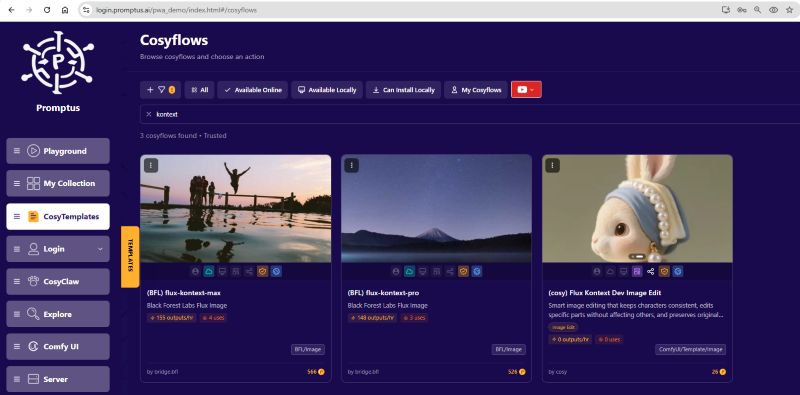
Some of the workflows avaialbe to run locally and on cloud include:
(cosy) Flux Kontext Dev Image Edit
Smart image editing that keeps characters consistent, edits specific parts without affecting others, and preserves original styles. From ComfyUI Image template: flux_kontext_dev_basic
(BFL) flux-kontext-max
Black Forest Labs Flux Image max model can be used on Promptus web or via the API server.
(BFL) flux-kontext-pro
Black Forest Labs Flux Image pro model can be used on Promptus web or via the API server
Advanced Prompting Techniques 🎯
- Iterative Prompting: Start simple (“a portrait with soft lighting”) then add layers (“add vintage film grain, pastel color palette, subtle lens flare”).
- Focused Edits: Use targeted commands to adjust elements (e.g., “change jacket color to emerald green,” “apply surreal background with floating lanterns”).
- Maintaining Consistency: Supply reference images or previous outputs to ensure characters or styles stay coherent across multiple generations.
- Combining Modalities: Upload sketches or rough layouts and describe desired transformations (“turn this sketch into a neon cyberpunk cityscape at dusk”).
Unlocking New Possibilities 🔥
- Style Transfer & Composition: Apply visual styles from one image onto another subject seamlessly.
- Contextual Edits: Modify scenes based on narrative cues (“convert daytime scene to twilight with warm ambient lighting”).
- Layered Transformations: Chain multiple prompts to evolve an image step by step, ensuring precision at each stage.
- Collaborative Workflows: Share Flux Context pipelines with team members in Promptus, iterate in real time, and publish for feedback.
Conclusion ✨
Flux Context in Promptus transforms AI image generation by merging image and text understanding into one intuitive workflow. Its iterative prompting and multimodal capabilities open new creative frontiers, ideal for professional projects where accuracy and consistency matter.
Dive into Promptus today to experience Flux Kontext’s revolutionary power! 🚀🎨