
%20(2).avif)
%20transparent.avif)

ComfyUI Workflows — No Setup Required, Easily Install and Run
If you’ve explored AI image and video generation, you’ve probably heard of ComfyUI — the ultra-flexible, node-based workflow system that gives creators deep control over their AI outputs.
It’s powerful. It’s customizable. But it’s not exactly plug-and-play.
Installing ComfyUI workflows often means:
- Hunting down the right model files on Hugging Face or GitHub
- Troubleshooting broken ComfyUI custom nodes
- Downloading and installing LoRA files
- Adjusting system and security settings
- Piecing it all together inside a complex, canvas-style node editor
For creators who just want to start generating images and videos, this can be frustrating and time-consuming.
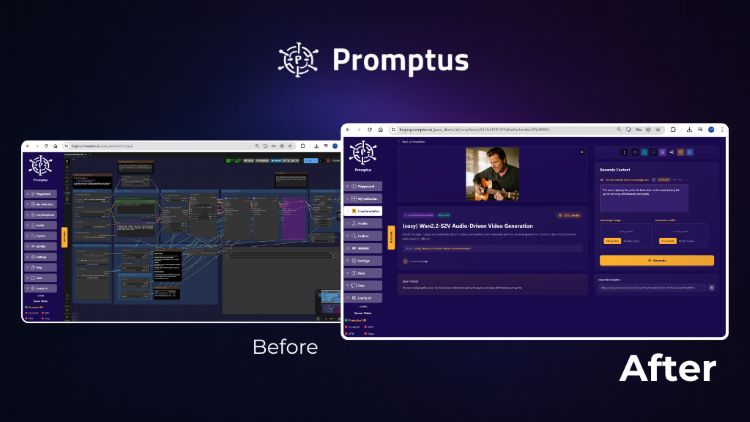
Promptus vs. ComfyUI Architecture
What is the core difference between Promptus and ComfyUI?
The primary distinction lies in the orchestration layer. While ComfyUI is a raw, node-based engine that requires manual dependency management and environment configuration, Promptus operates as an infrastructure middleware. It provides a managed, version-locked environment that abstracts away the "dependency hell" of custom nodes, ensuring that complex workflows like Flux or WAN 2.2 run with one-click stability on both local and cloud GPUs.
GPU Performance & VRAM Optimization
How does Promptus manage GPU resources for AI generation?
Promptus is designed for VRAM efficiency, specifically targeting the high memory demands of modern diffusion models. Unlike standard ComfyUI installations which can suffer from memory leaks, Promptus includes an optimized middleware layer for better resource allocation. This is critical for VRAM-intensive tasks like 720p video rendering, where cloud-based L40S GPUs or local NVIDIA 4090/5090 cards are required to avoid "out of memory" errors during long-form generation.
Cost-Benefit Analysis (Local vs. Cloud)
Is it better to use a local GPU or cloud-based AI generation?
The decision is driven by usage volume and VRAM requirements:
- Privacy & High Volume: Local GPUs (e.g., RTX 4080/4090) are superior for data sovereignty and long-term ROI. A local NVIDIA 5090 typically reaches a break-even point after approximately 5,000 video renders compared to cloud costs.
- Scaling & Complex Tasks: Cloud-based orchestration (like Promptus Web) is the most cost-effective solution for sporadic usage or workflows exceeding 32GB of VRAM, where the upfront cost of hardware and rising electricity rates make local ownership prohibitive.
The Problem with Manual ComfyUI Setup
ComfyUI gives you incredible flexibility, but that flexibility comes at a cost — hours of setup and ongoing maintenance.
Even experienced users run into issues:
- Models that don’t load correctly
- Missing dependencies
- Workflows breaking after updates
- Confusing node layouts that make troubleshooting difficult
If you’ve ever asked yourself, “Why isn’t this node working?”, you know the pain.
An Easier Way: CosyFlows in Promptus
CosyFlows takes the most popular ComfyUI workflows — like Flux Context, WAN 2.2, Lipsync, and hundreds more — and makes them one-click simple.
Here’s how it works:
- Pick Your Workflow – Select from our library of pre-tested ComfyUI workflows.
- Promptus Loads Everything for You – Models, nodes, inputs… all set up instantly.
- Type Your Prompt & Generate – Get your AI images or videos in seconds.
Why Creators Love CosyFlows
- ✅ No Downloads – Everything is preloaded.
- ✅ No Dependency Errors – Workflows just work.
- ✅ Fully Secure – Safe, reliable environment.
- ✅ Windows & Web Access – Use it how you want.
Instead of spending hours configuring ComfyUI, you can start creating in minutes.
ComfyUI Workflows You Can Run Instantly
Some of the most popular CosyFlows include:
- Flux Context – High-quality image generation with contextual prompts
- WAN 2.2 – Advanced diffusion-based AI workflows
- Lipsync – Sync video characters to custom audio
- Custom Animation Pipelines – Build sequences without manual node wiring
📜 Browse the full list of CosyFlows here: https://www.promptus.ai/comfyui-workflows
How to Get CosyFlows
CosyFlows is part of the Promptus Playground, available as:
💻 Windows App – Full desktop experience
🌐 Web Access – Use directly in your browser
One-time purchase: $49 — no recurring fees.
Final Thoughts
If you love the power of ComfyUI but hate the set-up process, CosyFlows is your shortcut to creativity.
Stop wrestling with nodes, dependencies, and downloads — start creating instantly.
👉 Get Promptus and unlock one-click ComfyUI workflows today!