
%20(2).avif)
%20transparent.avif)

ComfyUI in Promptus makes running FLUX tools a breeze
Quick answer: Promptus embeds ComfyUI directly into its platform, simplifying FLUX model workflows through CosyFlows — unified workflow execution and monetization options without manual setup.
Imagine having all the tools you need for advanced AI workflows at your fingertips, seamlessly integrated into one powerful platform. That’s exactly what happens when ComfyUI is embedded into Promptus. This dynamic duo simplifies workflows, enhances scalability, and unlocks opportunities for monetization.
Let’s break down how this integration works and how you can maximize its potential using CosyFlows.
🌐 Instant Access: Want to test the model right now without any setup? Try our browser-based Flux.1 Schnell AI Generation Website to create high-fidelity images instantly.
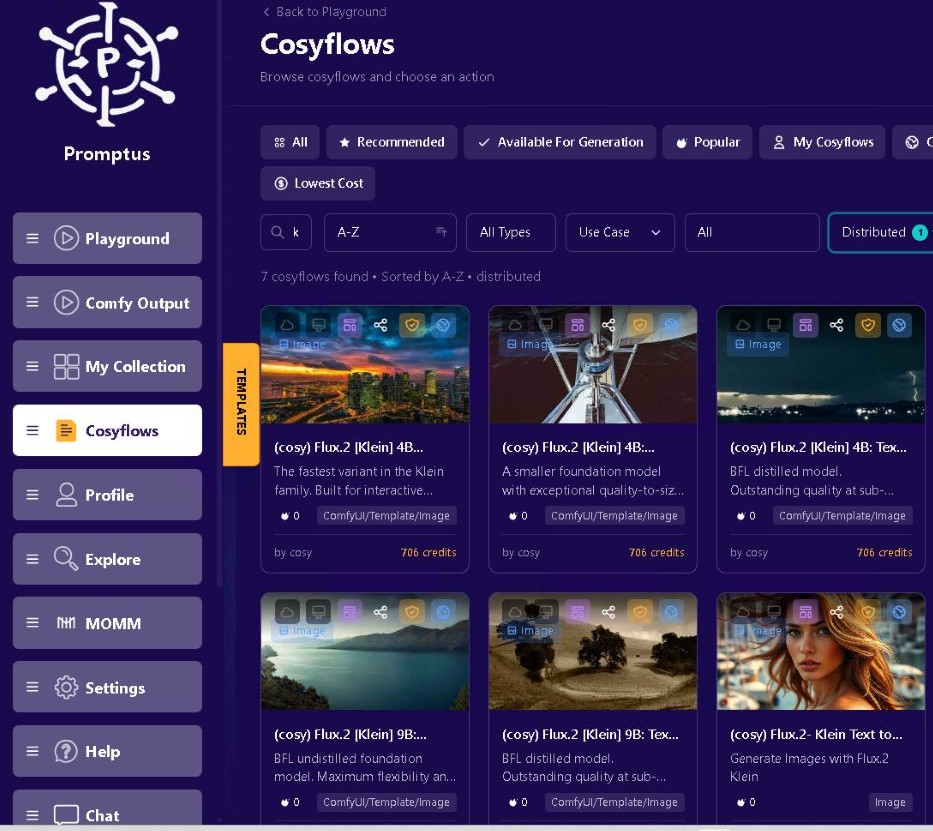
1. Unified Workflow Environment
When ComfyUI is embedded in Promptus, your entire workflow is centralized, making design and execution smoother than ever.
- Single Interface: Access FLUX tools and ComfyUI’s node-based features directly within Promptus without switching platforms.
- Pre-configured Compatibility: Build, test, and optimize workflows effortlessly. Tools like FLUX.1 Fill, Depth, and Redux integrate seamlessly.
- Enhanced Usability: Use intuitive features like intelligent prompt refinement and dynamic preview management.
2. GPU Resource Management
Running heavy models like Flux locally can choke a standard desktop. Promptus takes the hardware strain off your local machine by run heavy tasks on Promptus web using our GPU cloud platform.
- Offload Resource-Intensive Tasks: Massive operations like hyper-detailed depth mapping, high-resolution outpainting, and rendering run smoothly on shared cloud GPUs and CPUs.
- Parallel Processing: Need to test hooks or variations for a campaign? Generate multiple image variations or execute massive batch processes simultaneously without freezing your system.
3. Prompt Optimization for FLUX Tools
Promptus incorporates NLP-enhanced prompt refinement to fine-tune your inputs and ensure they align perfectly with FLUX tools.
- Fine-Tune Inputs: Optimize text-to-image prompts or masking instructions for better results.
- Iterate Quickly: Refine and re-run prompts dynamically, speeding up experimentation.
4. Workflow Simplification and Automation
Save time with automation features that eliminate manual errors and streamline data flow.
- Auto-Validation: Ensure nodes and connections are correctly configured.
- Streamlined Data Flow: Easily link FLUX tools like Canny and Depth.
- Previews at Key Stages: Monitor progress with intermediate output previews.
5. Monetization Through CosyTemplates
Promptus provides a direct, practical path to monetization built around professional workflow utility: CosyTemplate Publishing.
- Monetize Your Visual Logic: Once you build and perfect a highly stable ComfyUI workflow—such as a flawless multi-reference product placement or a specific character consistency loop—you can lock it and publish it as a custom CosyFlows Template.
- Earn from the Community: Other creators, agencies, and solo artists who need that specific output can access and run your template, allowing you to monetize your technical AI engineering expertise directly within the Promptus marketplace.
6. Scalable and Collaborative Team Capabilities
Promptus transforms ComfyUI from a isolated, solo desktop tool into a connected studio workspace.
- Enterprise Scalability: Multi-layered, complex generation pipelines are easily backed by scalable, distributed cloud compute.
- Real-Time Collaboration: Co-develop, debug, and share FLUX-enhanced node setups with team members live, paired with integrated toolsets and seamless Discord ecosystem publishing.

Why It’s Easier to Run FLUX inside Promptus
- Zero-Setup Infrastructure: FLUX nodes, CLIP models, and VAEs are pre-loaded, pre-configured, and ready to use on day one.
- Hybrid Compute Power: Seamlessly switch between local hardware execution to avoid cloud costs, or toggle on decentralized cloud resources to handle intensive tasks instantly.
- Turnkey Templates: Convert confusing background node webs into clean, front-facing CosyFlows tools with a single click.
Example Workflow
Here’s how you can use FLUX tools in Promptus to create an image:
- Generate a Depth Map: Use FLUX.1 Depth in ComfyUI to create a detailed depth map of an image.
- Apply Inpainting: Use FLUX.1 Fill to enhance or repair areas guided by the depth map.
- Preview in Real-Time: Monitor progress using Promptus’s preview interface.
- Create Variations: Use FLUX.1 Redux to generate stylistic variations.
Get Started Today
With ComfyUI deeply embedded into Promptus, running advanced FLUX models becomes a seamless, accessible, and financially rewarding experience. Whether you are an independent creator or managing a creative team, this integration empowers you to scale your visual production without hitting technical walls.
To experience the full Flux AI model suite on a professional ComfyUI interface, simply log into the Promptus Web App and choose your workflow template today!