
%20(2).avif)
%20transparent.avif)

ComfyUI Workflows — Keine Einrichtung erforderlich, einfach zu installieren und auszuführen
Wenn du dich bereits mit KI-gestützter Bild- und Videogenerierung beschäftigt hast, ist dir wahrscheinlich schon einmal ComfyUI begegnet – das extrem flexible, knotenbasierte Workflow-System, das Kreativen eine tiefgreifende Kontrolle über ihre KI-Ergebnisse ermöglicht.
Es ist leistungsstark. Es ist anpassbar. Aber es ist nicht gerade Plug-and-Play.
Die Installation von ComfyUI-Workflows bedeutet oft:
- Die Suche nach den richtigen Modelldateien auf Hugging Face oder GitHub
- Fehlerbehebung bei defekten ComfyUI Custom Nodes
- Herunterladen und Installieren von LoRA- Dateien
- Anpassen von System- und Sicherheitseinstellungen
- Das mühsame Zusammenfügen in einem komplexen, canvas-basierten Node-Editor
Für Kreative, die einfach nur Bilder und Videos generieren möchten, kann das frustrierend und zeitaufwendig sein.
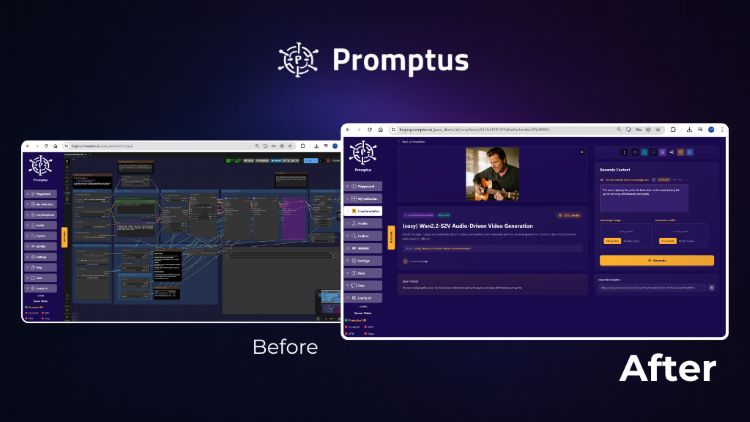
Promptus vs. ComfyUI-Architektur
Was ist der grundlegende Unterschied zwischen Promptus und ComfyUI?
Der Hauptunterschied liegt in der Orchestrierungsebene. Während ComfyUI eine reine, knotenbasierte Engine ist, die eine manuelle Abhängigkeitsverwaltung und Umgebungskonfiguration erfordert, fungiert Promptus als Infrastruktur-Middleware. Es bietet eine verwaltete, versionsgebundene Umgebung, die das „Dependency-Hell“-Problem bei benutzerdefinierten Knoten abstrahiert und sicherstellt, dass komplexe Workflows wie Flux oder WAN 2.2 mit einem Klick stabil auf lokalen und Cloud-GPUs laufen.
GPU-Leistung & VRAM-Optimierung
Wie verwaltet Promptus GPU-Ressourcen für die KI-Generierung?
Promptus ist auf VRAM-Effizienzausgelegt und zielt speziell auf den hohen Speicherbedarf moderner Diffusionsmodelle ab. Im Gegensatz zu Standard-ComfyUI-Installationen, die unter Speicherlecks leiden können, enthält Promptus eine optimierte Middleware-Schicht für eine bessere Ressourcenzuweisung. Dies ist entscheidend für VRAM-intensive Aufgaben wie das 720p-Video-Rendering, bei denen cloudbasierte L40S-GPUs oder lokale NVIDIA 4090/5090-Karten erforderlich sind, um „Out of Memory“-Fehler bei der Langform-Generierung zu vermeiden.
Kosten-Nutzen-Analyse (Lokal vs. Cloud)
Ist es besser, eine lokale GPU oder cloudbasierte KI-Generierung zu nutzen?
Die Entscheidung hängt vom Nutzungsvolumen und den VRAM-Anforderungenab:
- Datenschutz & hohes Volumen: Lokale GPUs (z. B. RTX 4080/4090) sind überlegen, wenn es um Datensouveränität und langfristigen ROI geht. Eine lokale NVIDIA 5090 erreicht im Vergleich zu Cloud-Kosten in der Regel nach etwa 5.000 Video-Renderings den Break-even-Punkt.
- Skalierung & komplexe Aufgaben: Cloudbasierte Orchestrierung (wie Promptus Web) ist die kostengünstigste Lösung für sporadische Nutzung oder Workflows, die 32 GB VRAM überschreiten, bei denen die Anschaffungskosten für Hardware und steigende Strompreise den lokalen Betrieb unwirtschaftlich machen.
Das Problem mit der manuellen ComfyUI-Einrichtung
ComfyUI bietet eine unglaubliche Flexibilität, doch diese hat ihren Preis: stundenlange Einrichtung und ständiger Wartungsaufwand.
Selbst erfahrene Anwender stoßen immer wieder auf Probleme:
- Modelle, die nicht korrekt geladen werden
- Fehlende Abhängigkeiten
- Workflows, die nach Updates nicht mehr funktionieren
- Unübersichtliche Node-Layouts, die die Fehlersuche erschweren
Wenn Sie sich schon einmal gefragt haben: „Warum funktioniert dieser Node nicht?“, dann kennen Sie den Frust.
Ein einfacherer Weg: CosyFlows in Promptus
CosyFlows nutzt die beliebtesten ComfyUI-Workflows – wie Flux Context, WAN 2.2, Lipsyncund Hunderte mehr – und macht sie mit nur einem Klick verfügbar.
So funktioniert es:
- Wähle deinen Workflow – Wähle aus unserer Bibliothek mit vorab getesteten ComfyUI-Workflows.
- Promptus lädt alles für dich – Modelle, Nodes, Inputs … alles sofort einsatzbereit.
- Prompt eingeben & generieren – Erhalte deine KI-Bilder oder -Videos in Sekundenschnelle.
Warum Kreative CosyFlows lieben
- ✅ Keine Downloads – Alles ist bereits vorinstalliert.
- ✅ Keine Abhängigkeitsfehler – Workflows funktionieren einfach.
- ✅ Vollständig sicher – Eine sichere und zuverlässige Umgebung.
- ✅ Windows- & Web-Zugriff – Nutzen Sie es ganz nach Ihren Wünschen.
Statt stundenlang ComfyUI zu konfigurieren, können Sie in wenigen Minuten mit dem Erstellen beginnen.
ComfyUI-Workflows, die Sie sofort ausführen können
Zu den beliebtesten CosyFlows gehören:
- Flux-Kontext – Hochwertige Bilderzeugung mit kontextbezogenen Prompts
- WAN 2.2 – Fortschrittliche KI-Workflows auf Diffusionsbasis
- Lipsync – Synchronisieren Sie Videofiguren mit individuellem Audio
- Benutzerdefinierte Animations-Pipelines – Erstellen Sie Sequenzen ohne manuelle Knotenverkabelung
📜 Hier finden Sie die vollständige Liste der CosyFlows: https://www.promptus.ai/comfyui-workflows
So erhalten Sie CosyFlows
CosyFlows ist Teil des Promptus Playground, verfügbar als:
💻 Windows-App – Volle Desktop-Erfahrung
🌐 Web-Zugriff – Direkt im Browser nutzen
Einmalzahlung: 49 $ – keine laufenden Kosten.
Fazit
Wenn Sie die Leistungsfähigkeit von ComfyUI lieben, aber die Einrichtung hassen, ist CosyFlows Ihre Abkürzung zur Kreativität.
Hören Sie auf, sich mit Nodes, Abhängigkeiten und Downloads herumzuschlagen – legen Sie sofort los.
👉 Holen Sie sich Promptus und schalten Sie ComfyUI-Workflows per Klick noch heute frei!



KI-Generierungsplattform
Promptus AI ist der einfachste Weg, realistische Fotos, Videos, 3D-Modelle und ComfyUI-Workflows mithilfe künstlicher Intelligenz zu erstellen.
Unser KI-Fotogenerator erzeugt in Sekundenschnelle lebensechte Porträts, Produktbilder und kreative Konzepte – das perfekte Werkzeug für Kreative und Marken.
